Showing posts with label tips and tricks. Show all posts

Tuesday, 20 November 2012

Cara Mengatasi Pengguna Netcut

 
Sebagian orang dari kalian pasti pernah mengalami hal menjengkelkan ketika sedang asik hotspotan?Misalnya,tiba-tiba koneksi wifi putus padahal kamu sedang download fileyang besar ataupun sedang mencari tugas sekolah dan kamu sudah menunggu cukup lama.

Kemungkinan hal tersebut karena ulah pengguna netcut untuk memutuskan koneksi wifi kamu.Cara kerja netcut adalah menjadikan laptop ataupun PC sebagai gateway.Jadi pengguna yang telah menginstall netcut tersebut bebas untuk mengatur siapa yang masuk dan siapa yang perlu keluar. 

Bagaimana cara mengatasinya pengguna Netcut ? 

1. Gunakan Anti ARP
Aplikasi Anti ARP berfungsi untuk melindungi komputer anda dari serangan program-program yang menghambat kerja anda seperti NetCut, P2Pover, Netrobocop, Winattacker, Spoofattack, Sniffattack, Cain & Abel dan sebagainya. Anti ARP akan menyaring ARP Spoof yang masuk, IP Conflict yang datang, ARP Spoof yang keluar, IP Spoof yang keluar, dan tipe serangan lainnya seperti Sniffer dari Cain & Abel serta program jahat lainnya. Anti ARP akan menampilkan statistic dari serangan yang datang dan serangan yang diblokir. Oleh karena itu Anti ARP sangat disarankan untuk anda
Download Anti ARP 

2. Gunakan Hide MY IP
Dengan menyembunyikan IP Address juga dapat menangkal serangan NetCut sebab IP anda mungkin saja tidak akan terdeteksi oleh aplikasi NetCut si penyerang. Cara ini sering saya gunakan jika saya memang benar-benar butuhkan bila sedang melakukan privat browsing. Dengan menyembunyikan IP Address, anda akan menjadi lebih aman bila berada dalam sebuah jaringan baik Wi-Fi maupun LAN. Anda dapat menggunakan aplikasi Hide My IP untuk menyembunyikan IP anda. Aplikasi Hide My IP juga akan mengkonversi IP anda ke karakter singkat sehingga akan menyulitkan si penyerang. Catatan “Program hanya dapat berjalan bila PC anda terkoneksi atau terhubung dengan internet.
Download Hide My IP

3. Gunakan Firewall Fortify
Aplikasi Firewal Fortify mungkin terdengar asing bagi anda, namun aplikasi ini dapat menjadi Firewall yang tangguh dari serangan Backdoor dan program jahat lainnya. Bahkan serangan sniffer dari program jahat pun akan ditangkal oleh aplkasi Firewall Fortify ini. Catatan “Program hanya dapat berjalan bila PC anda terkoneksi atau terhubung dengan internet”.
Download Firewal Fortify
4. Gunakan XP anti SPY
XP Antispy dapat anda gunakan untuk menghidden atau menyembunyikan komputer anda dari LAN atau W-LAN, sehingga IP Address, MAC Address, dan Komputer anda tidak akan tampil di LAN atau W-LAN. Hal ini akan sangat berguna sekali dalam menangkal serangan NetCut.
Download Xp Anti Spy

5. Gunakan Virtual Port (port palsu)
NetCut juga dapat ditipu, anda dapat melakukan penipuan terhadap NetCut dengan membuat Virtual Port atau Port Palsu. Untuk membuat Port Palsu, gunakan Tool port Monster.
6. Gunakan Netcut defender 
Aplikasi ini adalah pasangan dari Netcut,karena Aplikasi ini dari situs resmi.Jadi aplikasi ini sangat recomended bagi kalian Sobat Blogger sekalian

7. Gunakan Anti Netcut
Aplikasi anti NetCut dirancang khusus untuk menangkal serangan NetCut. Dilihat dari namanya anda sudah pasti mengerti. Seperti yang dikatakan banyak orang bahwa aplikasi ini akan melindungi computer anda dari serangan NetCut.
Download Anti Netcut

Update Software lainya
Sniffer - Wireshark (Wireshark.org) 
ARP ping - (google.com) 
Reverse ARP tool - (google.com) 
IP scanner - (google.com) 
ARP poisoning - (google.com)

Bagaimana Cara membalas pengguna yang memakai Netcut ?

Buat yang ingin balas dendam kepada pengguna netcut,lakukan langkah berikut
start menu > run > ketik cmd >> ketik ping google.com -t

Dengan menggunakan langkah diatas,laptop ataupun PC pengguna netcut akan dibanjiri ping secara terus menerus.Jika RAM nya rendah,dapat berakibat hank pada laptop atau PC pengguna netcut tersebut 

Jika ingin menegur dengan sopan,sebaiknya kamu datangi langsung pengguna netcut tersebut dan bilang “pakdhe,tolong matikan netcutnya” 

Selamat mencoba untuk Atasi Pengguna Netcut jika kamu sering merasa terganggu oleh pengguna netcut,semoga bermanfaat ^_^

Sunday, 3 June 2012

Proteksi Data Penting dengan My Lockbox

Proteksi Data Penting dengan My Lockbox. Apakah laptop/PC kita sering dipinjam atau digunakan oleh orang lain, seperti teman, saudara, atau bahkan ayah/ibu kita? Jika ya, maka kita perlu mengamankan data-data penting yang tersimpan di laptop/PC agar orang yang menggunakan laptop/PC kita tersebut tidak dapat mengaksesnya atau membukanya.

Untuk tujuan tersebut, kita dapat menggunakan bantuan software. Salah satu software yang dapat kita gunakan adalah My Lockbox. My Lockbox adalah software gratis (freeware) yang dapat memproteksi folder (yang berisi file-file atau data-data penting lain) agar tidak dapat diakses / dibuka oleh orang lain dengan memberikan password.

Folder yang telah diproteksi akan menjadi tersembunyi dan tidak terlihat oleh orang yang tidak berhak. Jadi tanpa mengetahui passwordnya, orang lain tidak dapat mengakses folder yang telah diproteksi dengan My Lockbox tersebut.

Berikut beberapa fitur dan keunggulan My Lockbox :
· Support hotkey untuk membuka control panel dengan sebuahkeystroke sederhana.
· Proteksi dengan password yang efektif.
· Mendukung volume FAT,FAT32, NTFS.
· Mendukung sistem operasi windows (XP, Vista, Win 7) termasuk edisi 64-Bit.
· Dapat mengunci semua folder yang ada pada komputer dengan password.
· Proteksi yang instant, tidak menyebabkan file menjadi berantakan dan saling berebut tempat.
· Melindungi folder bahkan dalam modus aman.
· Aplikasi ini merupakan freeware alias gratis namun jika menghendaki, kita dapat melakukan upgrade ke My LockBox pro(profesional edition) namun tentunya tidak gratis lagi.
· Proteksi yang diberikan sangat aman,bahkan system administrator juga tidak akan dapat mengakses tanpa password yang benar dan valid.
· mampu memproteksi folder meskipun sistem berjalan dalamSafe Mode.

Pra Penggunaan My Lockbox

1. Pertama, silakan lakukan download softwarenya terlebih dahulu di SINI.
2. Kedua, lakukan installasi file My Lockbox dengan mengklik “mylockbox_setup” kemudian tinggal meng-    
    klik next-next hingga installasi berakhir.
3. Ketiga, pada proses installasi kita disuruh untuk memasukkanpassword. Buatlah password yang sulit   
    ditebak oleh orang lain atau program pelacak password.


4. Keempat, selamat mencoba menggunakan My Lockbox.

Langkah-langkah menggunakan My Lockbox untuk memproteksi suatu folder adalah sebagai berikut.

1. Pertama, jalankan My Lockbox dengan mengklik shortcutnya pada desktop, kemudian masukkan 
    password dan screenshotnya seperti di bawah ini.


2. Kedua, klik tab “Set” sehingga muncul jendela Browse For Folder. Pilihlah salah satu Folder yang akan 
    diproteksi kemudian lanjutkan dengan menekan OK. (Pada contoh ini, saya akan memproteksi folder 
    E:\Games


3. Ketiga, kemudian klik tab "Lock" (ada di sebelah kiri)


4. Keempat, jika berhasil pastikan statusnya menjadi “Locked” dengan simbol silang berwarna merah, 
    seperti screenshot di bawah ini.


5. Kelima, untuk memastikan bahwa folder telah terproteksi dan tersembunyi, silakan buka Windows 
    Explorer dan pastikan folder tersebut (yang kita protek) sudah tidak terlihat lagi. Pada contoh ini, folder 
    E:\Games sudah tidak terlihat lagi.

6. Keenam, untuk membuka kembali folder yang telah kita proteksi adalah tinggal mengklik tab “Unlock” 
    yang ada si sebelah kiri. Sekarang, silakan lihat folder yang telah dibuka akan terlihat lagi pada Windows 
    Explorer.


7. Ketujuh, selamat Mencoba.


DOWNLOAD MY LOCKBOX

Kunci Keyboard dan Mouse dengan Aplikasi Kidkeylock

Kunci Keyboard dan Mouse dengan Aplikasi Kidkeylock. Apakah laptop/PC kita sering dipinjam atau digunakan oleh anak-anak kita? Di satu sisi, kita mungkin tidak bisa melarang anak kita menggunakan laptop milik kita. Namun di sisi lain, jika mengizinkannya, kita menjadi kuatir laptop/PC dapat menjadi rusak karena ketidaktahuan anak-anak dalam menggunakan atau dalam memperlakukan laptop.

Nah, pada kesempatan ini Tips dan Trik Komputer akan memberi alternatif solusi. Sebenarnya kita melarang menggunakan laptop/PC tanpa disadari oleh anak-anak kita. Kita dapat mengkunci beberapa atau bahkan semua tombol keyboard dan juga tombol mouse. Dengan demikian mungkin anak-anak menjadi malas dan mengurungkan niatnya untuk meminjam laptop / PC milik kita karena mereka merasa tidak dapat menjalankan laptop karena beberapa tombol keyboard dan mouse telah dikunci (locked).

Untuk tujuan tersebut, Tips dan Trik Komputer menawarkan aplikasi gratis (freeware) yang dapat mengkunci beberapa tombol keyboard dan mouse. Adalah Kidkeylock yang dapat kita jadikan alternatif untuk memproteksi laptop/PC agar orang menjadi malas untuk menggunakannya.

Berikut kegunaan dari Kidkeylock.

Pilihan untuk mengunci mouse adalah sebagai berikut.
· Lock Left mouse button (mengkunci klik kiri)
· Lock Middle mouse button (mengkunci klik tengah )
· Lock Right mouse button (mengkunci klik kanan )
· Lock Double click (mengkunci klik ganda )
· Lock Mouse wheel (mengkunci roda mouse )

Pilihan untuk mengunci keyboard adalah sebagai berikut.

· Standard character keys (mengunci huruf, angka, simbol, dll)
· Additional keys (mengunci Navigation keys, function keys, ins/del, home/end, dll)
· Windows system shortcuts (mengunci alt-tab, win-key, dll)
· Mengkunci semua tombol pada keyboard

Dengan fitur seperti di atas, kita dapat mengatur sesuai selera atau kebutuhan masing-masing.

SEBELUM MENGGUNAKAN KIDKEYLOCK


Jika tertarik, silakan untuk mendownloadnya terlebih dahulu aplikasi Kidkeylock-nya di SINI.
Karena file nya dalam bentuk zip maka lakukan ekstrak terlebih dahulu.
Setelah itu, lakukan installasi sesuai dengan petunjuk hingga selesai.
Setelah installasi berhasil kemudian jalankan Kidkeylock dan tanda aplikasi ini sedang berjalan adalah terlihat icon gambar kunci dan tulisan KKL pada systray.

Berikut cara menggunakan aplikasi Kidkeylock.

Pertama, klik kanan pada icon Kidkeylock yang ada pada systray (ada di bar kanan bawah) kemudian pilih "SETUP" yang kemudian akan muncul jendela Kidkeylock Setup, seperti gambar di bawah ini.


Kedua, lakukan penggantian password terlebih dahulu. Passwordnya ada dua macam.
Password to show Setup, berguna untuk membuka kotak dialog setup.
Password to quit KidKeyLock, berguna untuk keluar dari aplikasiKidKeyLock.

Ketiga, untuk mengkunci tombol mouse, kita tinggal meng-klik sesuai opsi yang kita inginkan.


Keempat, untuk mengkunci tombol keyboard, kita tinggal menggeser slider ke kanan atau ke kiri, seperti secreenshot di bawah ini.


Kelima, kita juga dapat melakukan pengkuncian dengan cara klik kanan pada icon Kidkeylock (systray) kemudian pilih Locks kemudian lanjutkan dengan memilih opsi pengkuncian.

Keenam, selamat mencoba dan “mengerjai” anak-anak kita atau bahkan orang lain yang tidak ingin laptop kita digunakannya.

Download Kidkeylock

Pasang Widget Translator

Memasang widget translator atau "Penerjemah" pada blog banyak sekali gunanya. Translator ini berguna apabila ada pengunjung dari negara lain yang secara sengaja maupun tidak yang melihat blog kita dan tidak tahu bahasa kita maka mereka bisa menggunakan widget ini untuk menterjemahkannya kedalam bahasa yang mereka inginkan (tentunya yang sudah ada di widget ini). Widget ini sudah support untuk bahasa Indonesia. Dan kalo kamu mau, translator ini bisa juga untuk menterjemahkan tugas dari sekolah/kampus secara mudah. Dan hasilnya bisa lebih bagus daripada software transtool lho. Gimana? mau membuatnya? caranya mudah lho. Gini nih caranya....

1. Login ke Blogger trus pilih menu "Layout" atau "Tata Letak"
2. Kemudian klik pada "Add Gadget" atau "tambah gadget=".
3. Lalu pilih HTML/Javascript"
4. Kemudian masukkan script berikut ini kedalamnya.

<script src="http://www.gmodules.com/ig/ifr?url=http://www.google.com/ig/modules/translatemypage.xml&up_source_language=id&w=160&h=60&title=&border=&output=js"></script>

5. Kemudian simpan.

Coba sekarang lihat blogmu maka ada tampilan seperti ini :

Gadgets powered by Google

Coba dites apakah translator tersebut bekerja dengan baik atau tidak.

Gimana? gampang kan...

Tips Mengedit HTML Blogspot


Jika kita mengotak-atik atau mengedit HTML blog kadang2 akan mengalami kesulitan, apalagi bagi yang masih agak pemula. Entah itu gak bisa nemu kode yang mau diedit lah, gak bisa disimpan karena error lah, Ada pesen error yang gak jelas lah, dan lah-lah yang lain, ya to...??? Nha trik dan tips kali ini akan mencoba gimana cara untuk mengatasi atau setidaknya mengurangi masalah "lah-lah" yang kadang2 atau sering terjadi tersebut.
Berikut ini beberapa tips untuk edit HTML bogger:


1. Backup Template

Membackup template ini penting karena jika terjadi hal-hal yang tidak dinginkan, misalnya blog jadi rusak maka kita bisa membuatnya seperti sediakala (sebelum rusak) jika kita sebelumnya sudah membackup template. Cara membackup template ini mudah. Cukup klik pada link "Download Full Template" lalu simpan file template di komputer kita. Kalo terjadi kesalahan yang tidak bisa kita atasi, kita tinggal upload aja file template tersebut.

2. Memberi Tanda Centang pada Kotak "Expand Widget Template"

Ini yang kadang2 dilupakan para "editor". Kalau kotak "Expand Widget Templates" tidak dicentang maka kode2 yang dicari kemungkinan tidak ditemukan. Tapi kadang2 hal ini tidak perlu dilakukan tergantung dari petunjuk tutorialnya. Makanya perhatikan baik2 tutorialnya kalo mau Edit HTML blog.

3. Tips Mempermudah Pencarian

Untuk mempermudah pencarian kode yaitu dengan meng-copy dulu kode yang mau dicari kemudian tekan "Ctrl+f" lalu masukkan kode yang dicopy tadi kedalam kotak yg muncul. Kalo misalkan kode yang dicari tidak muncul maka cobalah mencari sebagian dari kode tersebut. Misal mau mencari kode <p><data:post.body/></p> jika tidak ketemu maka cb carilah sebagiannya atau seperti inidata:post.body kalau sudah ketemu maka klik tombol next untuk melihat apakah ada kode lain yang sama untuk memastikan kode yang dikehendaki. Tapi tips ini sepertinya sulit dilakakukan jika menggunakan browser "Chrome" paling mudah jika menggunakan "Mozilla Firefox".


4. Tips Menghadapi Error Yang Muncul

Jika saat menyimpan hasil editan kemudian muncul pesan error, misal seperti ini:
We were unable to save your template
Please correct the error below, and submit your template again.
Your template could not be parsed as it is not well-formed. Please make sure.....
Maka hal yang harus kita lakukan adalah berusaha memahami pesan error tersebut. Kemudian kita cek kembali tutorial yang kita baca apakah langkah-langkah yang sudah kita lakukan bener2 sesuai dengan tutorialnya. kalau tidak yakin maka kita bisa mengulangi lagi tutorialnya dari awal dengan mengklik tombol "Clear Edit" terlebih dahulu.


Mungkin untuk masalah mengahadapi berbagai pesan error ini akan kita bahas lebih lanjut diepisode yang lainnya yang lebih spesifik.

Saturday, 2 June 2012

Cara mengatasi duplicate Title Tag dan Meta Description akibat Plugin Mobile Pack

Memang dunia SEO ini penuh dengan tantangan dan perlu banyak belajar. Beberapa minggu kemarin dikejutkan dengan berkurangnya halaman index di google dan dengan jerih payah akhirnya mendapatkan solusinya. Eh... Sekarang muncul lagi permasalahan yang sama, yaitu berkurang halaman index di google, penyebabnya juga karena duplicate title tag dan meta description. Tetapi kali ini diakibatkan oleh pemasangan Mobile Pack. Cara penyelesaiannya juga berbeda. Kok tahu akibat dari Mobile Pack? Nah itulah fungsinya Webmaster Google, kita dapat memantau aktifitas blog kita setiap saat meskipun update dari website google tidak tentu (tergantung mood-nya google kali ya...).
Berikut ini cara mengetahui permasalahan yang sedang dihadapi oleh blog kita lewat webmaster google:

  • Masuk atau sign in ke dashboard webmaster google.
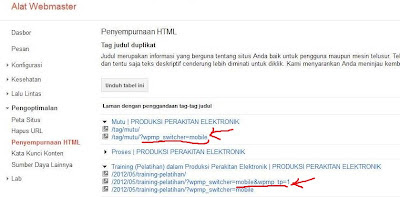
  • Kemudian ke "Penyempurnaan HTML" atau "HTML improvement", maka akan muncul halaman seperti dibawah ini : 


  • Kliklah kata-kata yang berwarna biru (daerah yang perlu disempurnakan)
  • Akan muncul beberapa kesalahan, kemudian kliklah kesalahan-kesalahan tersebut untuk mengetahui penyebabnya seperti gambar dibawah ini :


Jadi, dengan cara seperti diatas kita sudah mengetahui bahwa penyebab utama berkurang index halaman blog kita di google adalah gara-gara wpmp_switcher=mobile dan wpmp_tp=1.

Menambahkan meta "noindex" di Themes Mobile Pack kita.
  • Login ke cpanel wordpress blog kita (kalau saya pakai control panel idhostiger)
  • Masuk Root directory blog kita (khusus yang pakai idhostinger, signin>control panel>file manajer 1>public_html)
  • Root directory : domainblogkita/wp-content/themes/mobile_pack_base

  • Kemudian edit header.php dengan menambahkan
<meta name=”robots” content=”noindex” />
ingat: harus sebelum </head>


  • Kemudian "SAVE"

Membatasi Crawl Googlebot ke URL parameter wpmp_switcher=mobile dan wpmp_tp=1
Langkah ini adalah untuk memberitahu kepada Google untuk tidak meng-crawl URL parameter wpmp_switcher=mobile dan wpmp_tp=1

  • Login ke Webmaster google
  • Klik "Site configuration" atau "konfigurasi"
  • Klik "URL Parameters" atau "Parameter URL"
  • Klik "edit" pada wpmp_switcher dan wpmp_tp seperti gambar dibawah ini :


  • Pada pertanyaan : "Apakah parameter ini mengubah konten laman yang dilihat pengguna?"
          atau dalam bahasa inggrisnya "Does this parameter change page content see by the user?"
          klik : Ya, Mengubah, mengurutkan ulang, atau menyempitkan konten laman
          atau "yes, change, reorders, or narrows page content"
  • Pada pertanyaan "URL mana dengan parameter ini yang harus dirayapi Googlebot?
          atau dalam bahasa inggrisnya "Which URLs with this parameter should Googlebot crawls?
  • Klik "Tidak ada URL" atau "No URL"
  • Klik "Simpan" atau "Save"
Catatan : Mengapa saya harus pakai kata "atau" ?
Jawaban : Karena ada webmaster yang pakai bahasa indonesia, ada yang memakai bahasa inggris.
Jadi untuk memudahkan para pembaca dalam mencarinya di webmaster google, saya memakai 2 bahasa.

Demikianlah cara untuk mengatasi Duplicate tittle tag dan meta description yang diakibatkan oleh Plugin Mobile Pack. Semoga bermanfaat...

Selamat Mencoba....

Sumber : vivanews.com

Thursday, 31 May 2012

Tips Menghadapi Ujian Kenaikan Kelas


Hingar bingar pengumuman hasil UN belum selesai. Kini sudah menunggu pula ujian kenaikan kelasbagi siswa di jenjang pendidikan dasar dan menengah. Diperkirakan minggu kedua atau ketiga Juni mendatang akan diadakan ulangan umum semester (UUS) naik kelas untuk kelas 1 – 5 tingkat sekolah dasar, kelas 7 dan 8 tingkat SLTP dan 10 – 11 jenjang SMU.


Ujian kenaikan kelas sesungguhnya tidak kalah menegangkan dibandingkan dengan UN. Alasannya tentu sangat sederhana. Jika gagal ujian maka siswa akan tinggal kelas! Resikonya tentu akan mengulang tahun depan pada kelas yang sama. Hayo, coba bandingkan tidak naik kelas dengan tidak lulus UN!

Agar sobat siswa tidak mengalami kegagalan maka sebaiknya mempersiapkan diri mulai dari sekarang. Berikut info pendidikan memberikan tips ringan untuk menghadapi ujian kenaikan kelas.

1. Benahi semua buku catatan pelajaran
Buku catatan pelajaran merupakan ringkasan materi pelajaran atau berisi materi pelajaran yang penting saja. Periksa kembali semua buku catatan pelajaran, terutama yang akan diujikan pada ujian kenaikkan kelas. Jika kurang lengkap maka lengkapi segera. Bagaimanapun, buku catatan ini sangat penting buat mengulang pelajaran di rumah.

2. Periksa kembali berkas ulangan harian yang diberikan guru.
Memeriksa kembali berkas ulangan harian sangat penting terutama berkaitan dengan kriteria ketuntasan minimal (KKM). Jika ada yang belum tuntas atau pas nilai KKM, bicarakan kembali dengan guru mata pelajaran bersangkutan.

3. Periksa kembali tugas yang diberikan guru.
Jangan anggap enteng tugas atau latihan yang diberikan guru. Mungkin ada tugas pada mata pelajaran tertentu yang belum diserahkan atau belum lengkap. Ketahuilah, nilai tugas termasuk unsur penilaian pada rapor. Coba pelajari juga cara menghitung nilai rapor semester.


4. Ketahui dengan baik mekanisme pengolahan nilai rapor semester. 
Bahwa unsur-unsur penilaian pada rapor semester adalah ulangan harian (UH), tugas, ulangan tengah semester (UTS) dan ulangan umum semester (UUS).

5. Pelihara kesehatan dan kurangi bergadang.
Kesehatan adalah modal utama kebugaran fikiran dalam menghadapi ujian. Jika sobat siswa kurang sehat, misalnya flu atau batuk, pasti akan mengganggu konsentrasi dalam mengerjakan soal-soal ujian. Oleh sebab itu kurangi bergadang atau melakukan pekerjaan yang menguras tenaga. Tentu saja imbangi dengan makanan dan minuman yang sehat.

6. Berdoa dan mohon doa restu kedua orang tua.
Berdoa dan mohon restu orang tua agar sukses ujian dan naik kelas. Bagaimanapun, keberhasilan siswa tak lepas dari restu orang tua siswa. Jika merasa bersalah atau berdosa pada orang tua, maka segeralah minta maaf.

Demikianlah tips ringan untuk menghadapi ujian naik kelas.:)

Sumber : vivanews.com

Saturday, 19 May 2012

How to Speed ​​up Internet Connection In Windows 7

Internet connection speed can be increased, at least there are 2 ways like the followingwhich I will present, through:

A. Local Group Policy Editor

 1. Click Start - type gpedit.msc
      the programs and files search box
 2. Click on Administrative Templates
      the Computer Configuration


3. Double clik Network


4. Double clik QoS Packet Scheduler


5. Double clik Limit reservable bandwidth


6. Click Enable, and the Bandwidth limit%
     change the number to 0


7. Clik OK

B. Local Area Connection

1. Log in Contol Panel - All Control Panel Items -
    Network and Sharing Center
    Then click Local Area Connection


2. Clik Properties


3. Click Configure - select the Advanced tab,
    then click the Speed ​​& Duplex,
    then select 100 Mbps Full Duplex, finally click OK


4. You do not get confused because after clicking OK, because the internet connection
    will be disconnected for a while. If this process fails
    then try to select 10 Mbps Full Duplex

5. Good luck

source: http://sinau-belajar.blogspot.com/2010/10/cara-mempercepat-koneksi-internet-pada.html

Tuesday, 10 April 2012

Creating Learning to Be More Fun

The elderly may be not easy having a child happy or like to learn? But the problem is, what we learn as children happy? If you have difficulties in learning or lazy learning and the like, the following tips that can Xpresi on to you:

1. The atmosphere is fun.
It is absolutely necessary condition so that you may enjoy learning. According to the results of research on the workings of the brain, the memory controller in the brain would be very easy to receive and record information that goes if it is in a pleasant atmosphere.

2. Make yourself easy to learn.
This is much more important than the claim itself would learn to be a champion or specific performance. Children who have acquired the performance but had not last. If you can feel that learning is something that is fun, you will have a great curiosity, and significantly influence the success of his study in the future.

3. Identify your dominant type.
Did you learn how to include the type of auditory (children easily accept the lesson by listening), visual (seeing) or kinesthetic (physical). If you are constantly learning in a way that does not correspond to type the way you learn, you will not be able to maximally absorb the content, so it does not develop to the maximum.

4. Learning to pause.
Give yourself a break every 20 minutes that would be far more effective than learning directly to one hour without a break. Results showed that children are able to fully concentrate a maximum of 20 minutes. More than that the child will begin to decrease the concentration. Pause 1-2 minute rest period will return the child back to its original concentration.

5. Keep your enthusiasm.
Son basically have the instinct to learn everything around him. Children will be very enthusiastic and eager to learn if the content / materials are studied according to the interests and development. We will definitely be learned easily bored if too easy for him, and instead will become stressed and discouraged if studied too hard.

How? Never tire of learning it.

Sources: teacher-indonesia.net

How To Change Domain Blogspot Become a Free CO.CC

How to change blogspot domain with co.cc free. Resume posting co.cc domain setting, this time I will give blogspot tutorial on how to change or alter the blogspot domain to co.cc. For those of you who have a blog on blogger with long names could try a free domain from co.cc, But remember, if your blog already has a high Alexa rank and are good at SEO, you should think of it to replace your blogspot domain. Simply follow the tutorial below.

1. Log in to your account. If you have not signed up, see how registration here.
2. Choose a domain to be used.


3. Click the Set up.

4. Pilih Zone Records.
Zone Records

In this section you will begin setting co.cc. domain The steps are not difficult. You just need a little patience because the change does not happen immediately.

These settings.
Host, fill with your co.cc domain (do not forget to use www). TTL, let it remain a D. Type, select CNAME. Value, type ghs.google.com.


After that go to the settings in blogger. Follow the instructions setting co.cc domain in blogspot below.

1. Log into your blogger account.
2. Select the Settings menu (Settings) »Publishing (Publish).
3. Click on Custom Domain.
4. Klik tulisan Switch to advanced settings.

5. In Your Domain field, fill in your co.cc domain was (still with the www).
6. Last Word Verification fill in the fields and save.

Quite got there just a way to change blogspot domain with co.cc. After completion of the tutorial above, your blog can not be opened for a while. time required to access the blog with your new domain usually only briefly. Maybe just a few minutes or several hours, a maximum of 2 days.

Sunday, 1 April 2012

Compulsory There In The Widget Blog


Actually, if the widget is? I think part of the widget is a blog that has a specific function. This widget is usually placed on the sidebar, or at some theme provided a place in the footer, header etc.. Then the widget is a must have in a blog?
you need to remember this is all just based on my observations of it:

1. Recent Comments. function of this widget is displaying the latest comments either from visitors or from your (admin) itself. Well other uses of this widget is the presence of the new visitors, will know about the article where the last comment. and usually, the article commented = article interesting or otherwise :-).

2. Popular Posts. function of this widget is to display the most popular articles, can be based on the number of comments or pageviews. and almost the same as recent comments, visitors will think "What exactly is the content of this article can be a really popular article".

3. Random Posts. function of this widget to display a random article, this widget is very useful when visitors are confused about doing the blog, now with this widget is not expected visitors quickly left the blog.

4. Subscribe. Actually this is only optional, but since I also use it so I included here.function for visitors to subscribe more easily when the article of this blog. several themes such as V2 trick. already providing this box to subscribe. so no need to use the widget.

While some widgets such as Recent Posts, Statistics, Category etc. It is not necessary, but for Recent post that may be required as well, and the category becomes mandatory if you do not use wpcustom dropdown menu to create a category.

Thursday, 29 March 2012

Detect problems that often occur on a computer or laptop

Detect problems on a computer is very important, so as not to interfere with the work and its use at the time of the unwanted. Especially when you're using a computer for work purposes, or the computer suddenly crashes laptop, of course it would add unnecessary pressure on yourself. It's important for you to know Things are actually from the computer you are using or you will experience this problem repeatedly in the future. Also, by recognizing the computer itself, the handling will be faster because you have to know where is the problem.


Well, Edutechnolife this time will provide some tips to find out where the possible location of the problem is happening on your computer in connection with the general case terhadi.
Performance Computer / Laptop Slow For such cases, many factors that influence and manyebabkan slow your computer performance. 1 . Hard drive capacity hard disk is almost full will be very slow overall computer performance. Check the hard drive capacity you use. If the usage has reached 80% or even 90%, then immediately take the necessary action, such as:

Backup data is somewhat rare to use (archive) into other media, such as a DVD or other media.If possible, you can delete data files that are not used anymore, let alone a huge capacity (usually multimedia files, etc.)
Perform regular maintenance on your hard drive defragmentation, so the more compact arrangement of files and saves a lot of space on the hard drive
Try to use more hard drive capacity is 80% of the total capacity of hard disk 2. The number of applications that are installed every program / ​​application is installed it will add a new burden on your computer. Check the list of installed applications and customize to your needs. It is better if you me-remove/uninstall programs that you no longer use or maybe you can turn off the service program (how terakir need foresight to do). 3. Virus Virus is also one of the main causes of slow computers. Why slow down a computer virus? Virus always interrupt the algorithm an application that has been infected by the virus. In addition the virus also make the services that disturbing.Scan and clean your hard drive for viruses. If your system is infected by the virus this way (scanning & cleaning) will surely greatly increase the performance of your computer. Computer / Laptop Popular Laptop Computers in general or if it gets too hot due to long usage telalu. Device is working too hard, or might be due to cooling systemnya not work properly. Sign of the cooling system does not work well usually the fan goes faster. Rest your computer for several hours. If necessary, consider the process of cooling the computer has been running well as a fan or air circulation. That's the common problems that you should know as a user's computer, laptop or other gadget that uses a computerized system. Which, allowing for anticipation or tackle your own before you ask for professional help to overcome permalahan you think is more complicated. Input / Output Problems with Input / Output: Often her computer activity, we can not be separated by other activities; Eat example. When we eat while moving around with a computer automated food debris and dirt will stick on the keyboard and mouse if it is done often it will be entered into. routinely cleaned monthly with a brush for the keyboard and to wipe with a tissue moistened with alcohol to clean the mouse.

If the Port VGA, Printer, Lan Card and others are not functioning properly you should do in general is clean before you claim that this component is damaged. Why the output port is often problematic? general case is that there is an input port by the dust and dirt entered the computer keport directly inhibit tarnish and transfer data. That was some common cases related problems that often occur on your laptop / computer. Above problems can usually be tackled alone without the need for professional help, and certainly will save you time if you know where the problem and also its handling.

Wednesday, 21 March 2012

How to Eliminate Windows Messaging Is Not Genuine In Windows 7

Windows Is Not Genuine Message in Windows 7 is often disturbing. But there is an easy way to remove Windows Messaging Is Not Genuine In Windows 7, namely the WGA Remover tool Chew


WGA Remover v1.2 How to use WGA Remover v1.2 to eliminate Chew Is Not Genuine Windows messages · Download WGA Remover tool v1 Chew. 2. in here 
· Click Apply to start the process.
· Wait until the installation is complete 
· Restart the computer

Hopefully, this tool can solve the problem out notification messages Windows Is Not Genuine In Windows 7

Sunday, 18 March 2012

5 Tips for Buying a Printer Infusion

Printer Infuse, a trend that has spread in almost all computer market segments, though not a little disappointed with the system printer intravenous infusion but still the first choice of our society.Little sharing tips on buying a printer that does not kecewe infusion in the future, hope usefulone. 

1. Consider the need, if not too much should not menginfus printer, just buy microCIS cartridge (cartridge which can be injected), the use of this microscis cartridge can extend the working printer because there is no problem with the hose "lodged". 

2. For the Canon printer should not have added to the exhaust system, because in addition to damaging the warranty, installation of sewers would be useless, because the Canon printer has a cork that holds a good disposal, it can last longer than the age of the printer itself. 

3. When comparing the infusion printer but do not compare prices to compare the thickness of the IV, because the printer's biggest problem is in the IV infusion, added thin IV tube plus easy problematic because they interfere with movement of the head printer. 

4. Note the printer warranty infusion, as this often creates problems later on, because I know some stores are competing to provide lifetime warranty, because to my knowledge there is no lifetime warranty on printer parts, printer parts automatically forfeited when we modify the printer. So make sure clarity about the warranty on the printer to be purchased infusion. 

5. Do not be easily influenced by marketing thigh printer, because I know at some stores are crowded many printers are "crazy" in the printer market infusion. A little advice: always pay attention to goals and always keep our faith. May the five tips above can help the reader before buying a printer infusion. 

If you want to add please add in the comments that other readers can mengatahui your valuable suggestions.

Saturday, 17 March 2012

Tricks Finding Dream Jobs

Many people say, good job is a job that allows you to do your hobbies or interests. If to get a job you love it you should be in and out of various companies, why not? But of course, to find a job that you like also need a strategy. The things what really makes you happy with the job? How do I get it? What factors are actually not so important? If your judgment based solely on salary, position and responsibilities, think again. First follow the steps below to ensure that your next job is right that you dreamed of: 

1. Immediately decided to change jobs Arguably, very few people who regret having to leave his old job in a company because he felt his new job even worse. Most people who resigned from his job someday regret all the time why not resign. We are often persist in the company, although the atmosphere is more comfortable (and energy squeezed-out) in the hope things will get better. Think back to this. If it's time to change jobs, make a decision immediately, and start looking for other jobs that fit your expectations. The longer you stay in a boring job, the more it will drain your energy and confidence you need to find a new one.

2. Give it time to look you will not know the work and office situations such as what would be suitable for you. Perhaps the first job you're applying, possibly also of the 5th, 6th, and so on. To be sure, give yourself time for you to search actively. Do not let you specify a time limit that makes you push yourself to take the job so you do not like. Also, do not inedible insistence of friends who encourage you to get out. 

3. Focus on what you like on the job, not that you hate A lot of people quit a job to avoid conflicts in the office. But when it decided to accept a new job, you can not just hold on to the things you want to avoid (which happened in the old office). Because, surely there are so many things you might want to avoid. Meanwhile, if you are too hard trying to avoid all the bad things, you still could not be happier. To feel happy at work, you need to focus on good things. Thankful that you get the job you aspire to in the past, though-for example-you have to travel a distance of 30 km from home to reach the office. 

4.Forget the old salary Most people would be expecting a higher salary, which makes them satisfied. However, this kind of thinking must be corrected. A study made ​​by two professors from Princeton University, the economist Alan B Krueger and psychologist Daniel Kahneman, stating that the high salaries that are often associated with good mood is actually just a fantasy. People with incomes above the average in general were satisfied with their lives, but less happy than other people, in everyday life. They tend to be more tense, and so can not follow a fun activity. A better income is certainly important, but if you received a raise of 25 percent, but feel stressed and frustrated all the time, it's no good does not it? 

5. Ignore the other stuff is irrelevantMost people accept the new job because of the position offered, special facilities (car and driver), name of company, status, or the pressure of the environment. You think, "If I took this job, my husband would be proud." Believe me, none of these factors that will make you happy. 

6.Ask for what you want will be easier to get what you want if you request it. Do not believe it? In a job interview, tell the interviewer that are comfortable and happy in the workplace is very important to you. Then tell them what you can make love work. Of course, by asking for these things does not mean you can get the job in question. But that's the point. If the job is not going to make you comfortable at work, you would not want it. 

7. Make it fun job you are the one who will make the job fun. You can sit at your desk, waiting for the co-worker or manager to make you happy. Or, you decide what makes you happy at work, told colleagues the other about it, and make it happen. For example, the work is fun when you are freed to channel your ideas. But, do not wait until the boss gives you a demanding task to convey the idea. Give your ideas whenever you can. 

8. Free yourself to step down in time It's torture when you can not get rid of the job that you dislike. Therefore, knowing that there is no necessity to survive in this company will actually make you like your job. Therefore, there is no pressure in doing so. 

source: Kompas.com

Friday, 16 March 2012

Habits that Make Strong Heart

The heart is a vital organ that must be maintained in order to be able to work optimally. For that there are 10 habits that could be done to strengthen the heart. What is it? 

Keeping the heart to stay healthy can help keep the other organs in the body works well for getting blood and oxygen intake is adequate. There are several things you can do to keep the heart strong, as quoted dariMenshealth.com, Tuesday (02/08/2011), namely: 

1. Quitting smoking
Has a habit or a spouse who smoked could increase 92 percent risk of heart attack. This is because the inhaled cigarette smoke can increase levels of bad cholesterol, lowers good cholesterol and improve blood clotting. 

2. Exercise 30 minutes 4 times a week 
Someone who exercise 2 hours or more a week have a 60 percent lower risk of heart attack than people who are not active. 

3. Lose weight 5-10 kg 
If you have excess weight, then lose 5-10 pounds can reduce the risk of death from heart attack. A study found overweight people had heart attacks 8.2 years earlier than people of normal weight. 

4. Consumption of five glasses of water a day
People who consume enough water to help reduce the risk of fatal heart attack by 52 percent. This is because the water helps thin the blood, thereby reducing the likelihood of clotting. 

5. Replacing coffee with tea 
Contains powerful antioxidants tests are flavonoids that provide a protective effect, hence people who consume tea at a lower risk of heart attack compared to coffee. 

6.Eating salmon and tuna on Saturday on Tuesday 
Researchers from the Harvard School of Public Health said that consumption of fish 2 times a week lowered the risk of heart by more than 30 percent, because of the content of omega-3 fatty acids. 

7. Ate cornflakes for breakfastcereals 
Contain the highest concentrations of folate (675 micrograms) than other cereals. Folic acid is known to finance the risk of cardiovascular disease. 

8. Count to 10 
Try to count the numbers 1-10 before reacting to a stressful situation, because it helps cool the body. Men are often angry at higher risk of having heart disease and heart attack before age 55. 

9. Eating watermelon 
Watermelon contains a compound lycophene 40 percent higher than the raw red tomatoes. Besides a high water content of watermelon can make it easier absorbed by the body and prevent heart disease. 

10. Ask your doctor whether it is worth the consumption of vitamin E and aspirin
Study, conducted by researchers at the University of Pennsylvania reveals vitamin E and aspirin are known to reduce plaque that can clog the arteries by 80 percent. 

Source: Detikhealth.com

Property Investment Tips for Beginners

If you are blind about investing in stocks or bonds, then invest in the property is actually a lot easier. 

Investing in property means you do not need to know about the mystery of capital markets and securities firms involving his friends, there are only two main parties: the owners and tenants or buyer. The right to use property, the tenant must pay some money to the owner.During the electricity and water still flows and the rent on time, both parties remain happy. 

As a new investor, you should consider to get into the property prior to other investment instruments like stocks and bonds. The easiest way to buy a home, remodeling a bit, then look for tenants.

There are many ways property investors to earn extra money without actually working from morning to evening. Some of the categories below are the types of property investments, quoted from beginnerinvest.com, Monday (27/11/2011) you can consider as an additional income or even your main income: 

1. Residential 
Invest in residential property means you buy a house, apartment, or apartment. The cost of investment in this type of property is the cheapest compared to other properties. After purchase, you can sum up the tenant or sell it back. You can perform a variety of reforms to the property before you buy leased or marketed. Creativity in the remodel determining rents or the price of your property.

2. Commercial Office Buildings
Investing in property of this kind need substantial funds. Because an office should have some supporting facilities, not just an ordinary house. Need some renovation if a house will be used as the office, but from your initial purchase or build a special building for offices. tenant office buildings are usually small companies that are still in developing stage or small and medium enterprises (SMEs). The exact location for this office building located in a busy area and not too far from the city center. 

3. Industrial property 
Includes the property in the industrial area, among others, for example, the warehousing, car parks or buildings with specific uses. If you buy properties like this should be leased for long periods of time, because its profits would be higher than you sell it. Because the lease on the property as it has an additional cost from the tenant because the room is used for business so that more can benefit you can . In addition, you can save a self-service drinks machines use coins for extra income. 

4. Shopping mall 
Property includes many kinds, ranging from a small shop in a house, shop and even a large mall.Typically, if you have one of these properties for rent, part of the profits of the tenant is also our right, of course in accordance with their respective agreements. Additional funds from the profits of the tenant is usually played back for the care and renovation of the property. 

5. Building Multi-Use 
Multi-purpose building is some combination of the above categories are gathered under one roof. For example, if you have enough money to buy a small building, or maybe some money could be obtained from the bank. So that payments are not too heavy, you can ask the bank to open stores on the bottom floor, while for the other floors you can find a tenant. Bank who loaned you the money will restore some funds to you in the form of UAG rent, so the debt and interest payments are not too weight.

Continue looking for the right tenant for an empty floor, it is better to diversify the type of business so it can better attract visitors. Well, technically, to lend some money to another party which they used to buy can be included as an investment property. However, such loans were leaning more towards fixed income investments like bonds or, as you lend money to guarantee a given property. 

Flowers are given to you in accordance with the agreement previously agreed upon. If there was a big gain or loss on the property which you lend money, it has absolutely no effect on your profits. So, Watch for this property investment instrument well before you start investing. 


source: detikhealth.com


6 Ways To Can Frugality & Saving

Downsize so they can set aside money for savings is a difficult thing to do. The amount of spending on daily necessities, making it difficult to spare some of your money. 

In fact, sometimes the money is not sufficient for you. So it appears that financial problems can affect physical and mental health, while also testing your ability to be a spouse, parents and good employees. 

Here are six simple ways to reduce your stress by making some simple changes that can be done in order to scrimp and save , as quoted from She Knows: 

1. Selling old stuff 
You can make a garage sale to sell the items and clothing you are old or disused. For items that are sold at prices significantly, then you can sell it through kaskus or eBay. Sell ​​your old stuff that has been used again is one way to get more money, so you can set aside money for savings. 

2. Creating a budget
Is a budget Creating a simple way how to spend your money with more discipline. You can see more clearly the spending plans. So that later you do not need to be involved in debt and set aside money for savings or family outing. 

3. Make note of groceries 
When you want to go to the mall or the supermarket for monthly shopping, make sure you make notes in advance of groceries and never leave home with an empty stomach. If you do not eat it first, you will spend more for food spending at restaurants. In addition, you should not need to take the children go shopping together. This is to avoid any unexpected expenses.

4. Shopping at discount shops or through online shopping 
At a discount is one way where you can buy clothes with the latest model without having to pay the normal price. You also can shop through the online shop. That way you can be more efficient in the shop, it does not have the cost of travel and tempted to buy another possibility if the mall. But before you decide to shop through the online shop, make sure first that the price offered cheaper prices than the stores and do not forget to calculate the price of goods offered at the cost of delivery. 

5. Have fun in saving 
If you lovers of film, surely you will spend your money by going to the movies. One way that you can spend your money is by watching a DVD at home. In addition to occasionally watch a DVD at home, you can also borrow books in the library without having to buy books in bookstores. That way you can minimize your expenses to have fun. 

6. If you can, buatalah own 
You just know that near your house has opened a coffee house. That way you immediately go to the store and buy the coffee drinks are fairly priced is not cheap. This can lead you to waste your money. If you can make coffee, you should make your own without having to buy coffee at coffee shops.So you do not need to spend more money. Sometimes little things can determine whether you succeed or fail in managing finances. But with some simple lifestyle changes and a little disiplinan yourself, you can save money and save enough money each year. 


source: wolipop.com

3 Tips for Finding Work You are unemployment

Unemployed out of work after a long time in the world economy was not good, is not a pleasant thing. But it is more difficult to be experienced by those who have never worked and long enough to be unemployed. Conditions that make the person more difficult to get a job. 

Those who have not been working hard to get a job or unemployment because most of the human resources department to choose the person who previously had experience. This is revealed from the New York Times article that discusses the matter of discrimination in the workplace. "Based on the review of some of the sites are quite popular job-seekers came to light, or job seekers prefer to hire people who are still working or have recently quit his job," wrote the newspaper them.

For those of you who have not had any experience and had worked, of course quite a headache reading the above fact. But that does not mean there is no way out to no longer be unemployed.Check out the tips, as quoted by She Knows following: 

1. Take any job position
If you get a job with a not positions you expect, you should not refuse the offer. You should have to think first before you reject it. If you get a job offer, but not with the preferred position, at least if accepted, you will become a worker or employee and no longer as unemployment. That way for the future if you want to find another job that suits your desires, it could be a reference work that can simplify your life later. 

2. To volunteer or join the internship program 
You will not get a job in a long time? You should try to become a volunteer or internship program may also follow the first in a company. Although you will not get paid with your hard-earned for a volunteer or intern at a company, at least it could be later on when applying your experience in the company desired.You can explain what work you do for a volunteer or internship during the program. 

3. Tell us your experience 
One of the best ways to become a candidate to be considered by a company that is by explaining what your previous job. Tell me about your experience. Although you are an unemployed who have never worked before or have never become a volunteer, but you can explain how your activity while you are unemployed. Do not hesitate to tell the activities or tasks and the work you've done. If you can explain how to become an unemployed it could be a valuable life lessons, you can also have the opportunity to qualify in a company. source: wolipop.com

Tuesday, 13 March 2012

Cara Memperbaiki Komputer yang Hang

Mungkin anda pernah mengalami ketika komputer dinyalakan pertama kali semuanya berjalan lancar, tapi beberapa menit kemudian komputer menjadi lambat dan kemudian komputer menjadi hang atau macet total, nggak bisa diapa-apain. Satu satunya cara adalah mereset komputer secara paksa kemudian komputer dinyalakan kembali, tetapi setelah beberapa saat komputer menjadi hang lagi, anda tentunya merasa kesal sebenarnya apa yang terjadi ?

Sebenarnya banyak faktor yang bisa membuat komputer menjadi melambat atau bahkan hang. Berikut ini adalah beberapa pengalaman saya ketika memperbaiki komputer yang hang.

1. Komputer hang karena CPU kepanasan
Sebagian komputer menjadi hang, karena sistem pendingin pada CPU tidak berjalan dengan baik. Untuk menanggulangi hal ini ada beberapa cara yang bisa kita lakukan :
Buka heatsing dan kipas processor secara hati - hati.
Bersihkan sirip-sirip pendingin dan fan processor dari debu, kalau fan macet beri minyak pelumas sedikit pada bagian poros kalau perlu ganti fan dengan yang baru.
Bersihkan thermal paste yang sudah kering yang menempel pada processor dan heatsink, ganti dan oleskan thermal paste yang baru.
Masukan lagi processor, heatsink serta fan kedalam dudukannya secara hati-hati.
Perhatikan posisi heatsink (pendingin) dan kipas Processor, pastikan kondisi Heatsing sudah terpasang secara benar terutama untuk tipe Heatsing untuk Processor socket LGA, perhatikan kondisi tiap-tiap sekrup yang terpasang.


Heatsink for Intel LGA 775

2. Komputer hang karena Power Supply kekurangan daya
Ada kalanya juga komputer hang karena Power Supply yang sudah rusak, meskipun tidak menyebabkan mati total, kekurangan daya pada power supply bisa menyebabkan kinerja komputer melambat bahkan komputer menjadi hang dan beberapa peralatan USB tidak terdeteksi atau tidak berfungsi.

3. Komputer hang karena hardisk bad sector
Saya pernah mengalami kejadian dimana setelah Windows booting semua tampak berjalan normal, tetapi ketika membuka sebuah dokumen dan mulai bekerja, tiba-tiba mouse dan keyboard diam, komputer menjadi hang!!!. Sayapun kemudian mencopot hardisk tersebut dan memasangkannya pada komputer lain kemudian menjalankan program checkdisk untuk memeriksa dan memperbaiki keruksakan pada hardisk tersebut. Setelah hardisk selesai diperbaiki kemudian dipasangkan kembali pada komputer sebelumnya dan Alhamdulillah kondisi komputerpun normal kembali.

4. Komputer hang karena VGA Card rusak
Beberapa komputer juga mengalami hang karena terdapat keruksakan pada katu VGA-nya. Hal ini juga pernah saya alami ketika seorang teman mengeluhkan kondisi komputernya yang tiba-tiba aja menjadi sering hang. Setelah saya cek ternyata heatsink pada kartu VGA terasa panasnya tidak normal, untuk itu sayapun kemudian mengganti kartu VGA tersebut dan ternyata setelah kartu VGA saya ganti kondisi komputer menjadi normal kembali.

5. Komputer hang karena koneksi LAN
Untuk komputer yang terhubung ke jaringan, kadang kala terasa berat ketika mengakses data dari komputer lain, program berjalan lambat dan akhirnya komputer seakan-akan menjadi hang. Untuk memastikan komputer hang karena koneksi jaringan (LAN), lepaskan dulu kabel jaringan pada komputer kemudian jalankan komputer seperti biasa. Apabila semua berjalan secara normal dapat dipastikan komputer hang karena koneksi jaringan.

Beberapa cara yang bisa dilakukan adalah:
pastikan konektor RJ45 terpasang dengan benar, bila perlu lakukan crimping ulang.
gunakan perintah ping untuk memeriksa koneksi jaringan
contoh perintah: ping -l 200 192.168.0.1
lakukan reset pada hub (switch) LAN, caranya bisa dengan mencabut kabel power Hub/Switch tersebut, tunggu beberapa saat kemudian masukan kembali.
cara lain yang bisa dilakukan adalah dengan memindahkan kabel jaringan dari port yang satu ke port yang lain (biasanya ada beberapa port dalam hub yang menjadi rusak karena masalah-masalah tertentu).
troubleshooting yang juga bisa kita lakukan adalah dengan mengganti kartu jaringan (LAN Card) dengan yang baru.

Itulah beberapa penyebab dan cara memperbaiki kondisi komputer yang hang, semoga membantu..Terima Kasih

.

.

.

.
Design by BlogSpotDesign | Ngetik Dot Com